Examples
Here are examples of how to call your API. There are 2 types of requests, authenticated and unauthenticated.
Unauthenticated Requests
Requests that do not require a login and permissions to execute. These are used for the logged out version of your application or for cron jobs where you might want to execute a specific API call on a schedule. These can also be used for public calls like generating a PDF via an API call. You can lock down where these requests are allowed to be executed from by domain name. Instructions for this are under docs/install & config, under Configure slender_settings_prod.settings. You can add unauthenticated calls to this file.
Login
Since you will be using the login request to authenticate a user, it does not require authentication. Here is an example of how to use the login API call.
//It is recommended to move all of this code to a generic
//function or class method where you can simply pass it data
//and it will make an API call and return your results
//instead of writing this giant code block for each API call.
function async doLoginApiCall() {
    let emailAddress = $('email_address').val();
    let password = $('password').val();
    let payload = {"email_address": emailAddress, "password": password};

    //Use the prepPayload function to ready your payload
    let sendPayload = prepPayload(payload);

    //This header auth is only used for login
    headers.Authorization = "Basic " + btoa(emailAddress + ':' + password);

    let returnJson = await fetch("https://api.yoursite.com/api/users/login", {
        method: 'POST',
        credentials: 'omit',
        headers: headers,
        body: sendPayload
    }).then((response) => {
        let status = response.status;

        return response.json().then((data) => {
            return {"status": status, "data": data};
        }).catch((err) => {
            return {"status": status, "data": err};
        })
    }).catch((error) => {
        return {"status": "offline", "data": error};
    });

    return returnJson;
}

//Always call this before sending your payload
function prepPayload(payload)
{
    const formData = new FormData();
    Object.keys(payload).forEach(function(key) {
        formData.append(key, payload[key]);
    });

    return formData;
}

//Example to call your login function
let retData = await doLoginApiCall();

//Set your user token now that the user is logged in
//You can check to see if this exists or not to show the
//logged in version or logged out version of your application
localStorage.setItem('user_token', retData.data.token);

//Grab the user's information
let userData = retData.data.user;
function doLoginApiCall(string $email, string $password): array
{
    $payload = [
        'email_address' => $email,
        'password' => $password
    ];

    $ch = curl_init("https://api.yoursite.com/api/users/login");

    $headers = [
        "Authorization: Basic " . base64_encode("$email:$password")
    ];

    curl_setopt_array($ch, [
        CURLOPT_POST => true,
        CURLOPT_POSTFIELDS => $payload,
        CURLOPT_HTTPHEADER => $headers,
        CURLOPT_RETURNTRANSFER => true
    ]);

    $response = curl_exec($ch);
    $status = curl_getinfo($ch, CURLINFO_HTTP_CODE);

    if ($response === false) {
        return [
            'status' => 'offline',
            'data' => curl_error($ch)
        ];
    }

    curl_close($ch);

    return [
        'status' => $status,
        'data' => json_decode($response, true)
    ];
}

$retData = doLoginApiCall($email, $password);

$_SESSION['user_token'] = $retData['data']['token'];
$userData = $retData['data']['user'];
export async function doLoginApiCall(emailAddress, password) {
    const payload = {
        email_address: emailAddress,
        password: password
    };

    const formData = new FormData();
    Object.keys(payload).forEach(key =>
        formData.append(key, payload[key])
    );

    const headers = {
        Authorization: "Basic " + btoa(emailAddress + ":" + password)
    };

    try {
        const response = await fetch(
            "https://api.yoursite.com/api/users/login",
            {
                method: "POST",
                credentials: "omit",
                headers,
                body: formData
            }
        );

        const data = await response.json();
        return { status: response.status, data };
    } catch (error) {
        return { status: "offline", data: error };
    }
}

import { doLoginApiCall } from "./api";

async function handleLogin() {
    const retData = await doLoginApiCall(email, password);

    if (retData.status === 200) {
        localStorage.setItem("user_token", retData.data.token);
        const userData = retData.data.user;
    }
}
using System.Net.Http;
using System.Net.Http.Headers;
using System.Text;
using System.Text.Json;

public class LoginResult
{
    public int Status { get; set; }
    public JsonElement Data { get; set; }
}

public class ApiClient
{
    private readonly HttpClient _http;

    public ApiClient()
    {
        _http = new HttpClient();
    }

    public async Task DoLoginAsync(string email, string password)
    {
        var payload = new Dictionary
        {
            { "email_address", email },
            { "password", password }
        };

        var authValue = Convert.ToBase64String(
            Encoding.UTF8.GetBytes($"{email}:{password}")
        );

        _http.DefaultRequestHeaders.Authorization =
            new AuthenticationHeaderValue("Basic", authValue);

        var content = new FormUrlEncodedContent(payload);

        try
        {
            var response = await _http.PostAsync(
                "https://api.yoursite.com/api/users/login",
                content
            );

            var json = await response.Content.ReadAsStringAsync();
            var data = JsonSerializer.Deserialize(json);

            return new LoginResult
            {
                Status = (int)response.StatusCode,
                Data = data
            };
        }
        catch (Exception ex)
        {
            return new LoginResult
            {
                Status = 0,
                Data = JsonSerializer.Deserialize(
                    JsonSerializer.Serialize(new { error = ex.Message })
                )
            };
        }
    }
}

var api = new ApiClient();
var result = await api.DoLoginAsync(email, password);

var token = result.Data.GetProperty("token").GetString();
var user = result.Data.GetProperty("user");
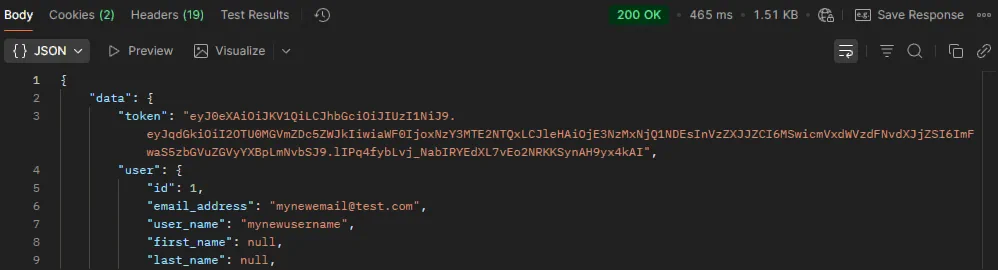
For your environment, setup your authorization using basic auth.Setup your base url in your environment. Input the email and password of the user you want to log in as.
After you send your request, it will return the token and user information or it will return an error response.
Register
This is an example of a simple user registration request. You do not need to be logged in to make this call.
function async doRegisterApiCall() {
    let emailAddress = $('email_address').val();
    let password = $('password').val();
    let userName = $('user_name').val();
    let payload = {"email": email, "password": password, "user_name": userName};

    //Always call this before sending your payload
    //This function can be found in the login example
    let sendPayload = prepPayload(payload);

    //For unauthenticated requests, set this to blank
    headers.Authorization = '';

    let returnJson = await fetch("https://api.yoursite.com/api/users/register", {
        method: 'POST',
        credentials: 'omit',
        headers: headers,
        body: sendPayload
    }).then((response) => {
        let status = response.status;

        return response.json().then((data) => {
            return {"status": status, "data": data};
        }).catch((err) => {
            return {"status": status, "data": err};
        })
    }).catch((error) => {
        return {"status": "offline", "data": error};
    });

    return returnJson;
}

//Example register call, will return errors or user id
let retData = await doRegisterApiCall();

let newUserId = retData.data.data.id;
function doRegisterApiCall(
    string $email,
    string $password,
    string $userName
): array {
    $payload = [
        'email' => $email,
        'password' => $password,
        'user_name' => $userName
    ];

    $ch = curl_init("https://api.yoursite.com/api/users/register");

    curl_setopt_array($ch, [
        CURLOPT_POST => true,
        CURLOPT_POSTFIELDS => $payload,
        CURLOPT_RETURNTRANSFER => true
    ]);

    $response = curl_exec($ch);
    $status = curl_getinfo($ch, CURLINFO_HTTP_CODE);

    if ($response === false) {
        return [
            'status' => 'offline',
            'data' => curl_error($ch)
        ];
    }

    curl_close($ch);

    return [
        'status' => $status,
        'data' => json_decode($response, true)
    ];
}

$retData = doRegisterApiCall($email, $password, $userName);
$newUserId = $retData['data']['data']['id'];
export async function doRegisterApiCall(email, password, userName) {
    const payload = new FormData();
    payload.append("email", email);
    payload.append("password", password);
    payload.append("user_name", userName);

    const headers = {
        Authorization: ""
    };

    try {
        const response = await fetch(
            "https://api.yoursite.com/api/users/register",
            {
                method: "POST",
                credentials: "omit",
                headers,
                body: payload
            }
        );

        const data = await response.json();
        return { status: response.status, data };
    } catch (error) {
        return { status: "offline", data: error };
    }
}

const retData = await doRegisterApiCall(email, password, userName);
const newUserId = retData.data.data.id;
using System.Net.Http;
using System.Text.Json;

public class ApiResult
{
    public int Status { get; set; }
    public JsonElement Data { get; set; }
}

public class UsersApiClient
{
    private readonly HttpClient _http;

    public UsersApiClient()
    {
        _http = new HttpClient();
    }

    public async Task DoRegisterAsync(
        string email,
        string password,
        string userName
    )
    {
        var payload = new Dictionary
        {
            { "email", email },
            { "password", password },
            { "user_name", userName }
        };

        var content = new FormUrlEncodedContent(payload);

        try
        {
            var response = await _http.PostAsync(
                "https://api.yoursite.com/api/users/register",
                content
            );

            var json = await response.Content.ReadAsStringAsync();
            var data = JsonSerializer.Deserialize(json);

            return new ApiResult
            {
                Status = (int)response.StatusCode,
                Data = data
            };
        }
        catch (Exception ex)
        {
            return new ApiResult
            {
                Status = 0,
                Data = JsonSerializer.Deserialize(
                    JsonSerializer.Serialize(new { error = ex.Message })
                )
            };
        }
    }
}

var api = new UsersApiClient();
var retData = await api.DoRegisterAsync(email, password, userName);

var newUserId = retData.Data
    .GetProperty("data")
    .GetProperty("id")
    .GetInt32();
Enter the information you want to send in your request
in the body section, filling out all required fields.
The register request will be sent.
Your response will contain a success or error code.
If it's a success, it will return their new id.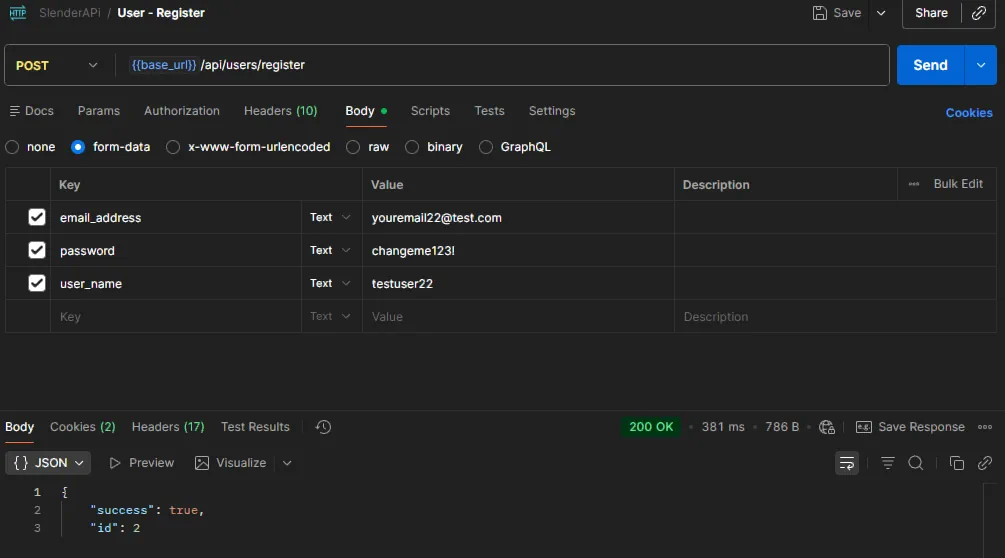
Authenticated Requests
Authenticated requests will fail if the user has not logged in or does not have permissions to execute once they are logged in.
Select Users
To view all users, by default, you must be logged in as an admin.
function async doSelectUsersApiCall(id) {
    let payload = {"id": id};
    let sendPayload = prepPayload(payload);

    //Grab your logged in user token from local storage
    //This is required for all authenticated calls
    headers.Authorization = localStorage.getItem("user_token");

    let returnJson = await fetch("https://api.yoursite.com/api/users/select", {
        method: 'POST',
        credentials: 'include',
        headers: headers,
        body: sendPayload
    }).then((response) => {
        let status = response.status;

        return response.json().then((data) => {
            return {"status": status, "data": data};
        }).catch((err) => {
            return {"status": status, "data": err};
        })
    }).catch((error) => {
        return {"status": "offline", "data": error};
    });

    return returnJson;
}

//Example to grab a single user
let retData = await doSelectUsersApiCall(22);

let userTwentyTwoData = retData.data.data;

//Example to grab all users
let retDataAll = await doSelectUsersApiCall();

let allUsers = retDataAll.data.data;
function doSelectUsersApiCall(?int $id = null): array
{
    $payload = [];

    if ($id !== null) {
        $payload['id'] = $id;
    }

    $headers = [
        "Authorization: " . $_SESSION['user_token']
    ];

    $ch = curl_init("https://api.yoursite.com/api/users/select");

    curl_setopt_array($ch, [
        CURLOPT_POST => true,
        CURLOPT_POSTFIELDS => $payload,
        CURLOPT_HTTPHEADER => $headers,
        CURLOPT_RETURNTRANSFER => true,
        CURLOPT_COOKIEFILE => "", // required to send cookies
    ]);

    $response = curl_exec($ch);
    $status = curl_getinfo($ch, CURLINFO_HTTP_CODE);

    if ($response === false) {
        return [
            'status' => 'offline',
            'data' => curl_error($ch)
        ];
    }

    curl_close($ch);

    return [
        'status' => $status,
        'data' => json_decode($response, true)
    ];
}

//Single User
$retData = doSelectUsersApiCall(22);
$userTwentyTwoData = $retData['data']['data'];

//All Users
$retDataAll = doSelectUsersApiCall();
$allUsers = $retDataAll['data']['data'];
export async function doSelectUsersApiCall(id = null) {
    const payload = new FormData();

    if (id !== null && id !== undefined) {
        payload.append("id", id);
    }

    const headers = {
        Authorization: localStorage.getItem("user_token")
    };

    try {
        const response = await fetch(
            "https://api.yoursite.com/api/users/select",
            {
                method: "POST",
                credentials: "include",
                headers,
                body: payload
            }
        );

        const data = await response.json();
        return { status: response.status, data };
    } catch (error) {
        return { status: "offline", data: error };
    }
}

//Single User
const retData = await doSelectUsersApiCall(22);
const userTwentyTwoData = retData.data.data;

//All Users
const retDataAll = await doSelectUsersApiCall();
const allUsers = retDataAll.data.data;
using System.Net.Http;
using System.Net.Http.Headers;
using System.Text.Json;

public class ApiResult
{
    public int Status { get; set; }
    public JsonElement Data { get; set; }
}

public class UsersApiClient
{
    private readonly HttpClient _http;

    public UsersApiClient(string userToken)
    {
        _http = new HttpClient();
        _http.DefaultRequestHeaders.Authorization =
            new AuthenticationHeaderValue(userToken);
    }

    public async Task DoSelectUsersAsync(int? id = null)
    {
        var payload = new Dictionary();

        if (id.HasValue)
            payload.Add("id", id.Value.ToString());

        var content = new FormUrlEncodedContent(payload);

        try
        {
            var response = await _http.PostAsync(
                "https://api.yoursite.com/api/users/select",
                content
            );

            var json = await response.Content.ReadAsStringAsync();
            var data = JsonSerializer.Deserialize(json);

            return new ApiResult
            {
                Status = (int)response.StatusCode,
                Data = data
            };
        }
        catch (Exception ex)
        {
            return new ApiResult
            {
                Status = 0,
                Data = JsonSerializer.Deserialize(
                    JsonSerializer.Serialize(new { error = ex.Message })
                )
            };
        }
    }
}

var api = new UsersApiClient(userToken);

//Single User
var retData = await api.DoSelectUsersAsync(22);
var userTwentyTwo = retData.Data.GetProperty("data");

//All Users
var retDataAll = await api.DoSelectUsersAsync();
var allUsers = retDataAll.Data.GetProperty("data");
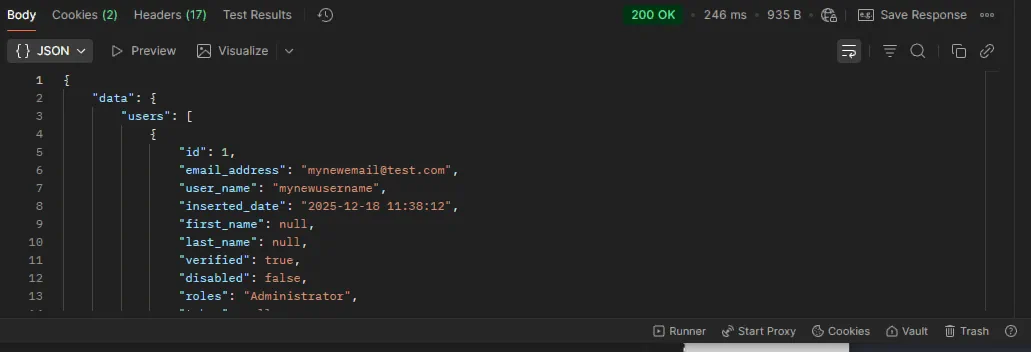
Once you are logged in, and your authorization is setup, You will notice your headers already conain your token.Now you can run your users/select call. You can pass in an id to return just that id, or you can leave it blank to return all users. If you are not an admin, it will return a permissions error.
If the call succeeds, it will return an array of user objects.